
YOUR TRIP IN YOUR POCKET
Everything About Your Trip, Right Where You Need It
When you book with Barefoot, your itinerary, confirmation numbers, flight updates, and travel documents all live in one secure place. The Tern app puts everything at your fingertips before you leave and all the way through your trip.


WHAT YOU CAN SEE
Your Whole Trip, Handled
Tern organizes everything Barefoot has planned for you into one clean, easy-to-use app. Here is what you will find inside.
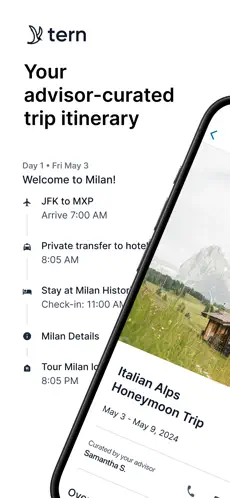
ITINERARY
Day by Day
Every flight, transfer, check-in, and activity laid out in order. You always know what is next and where you need to be.
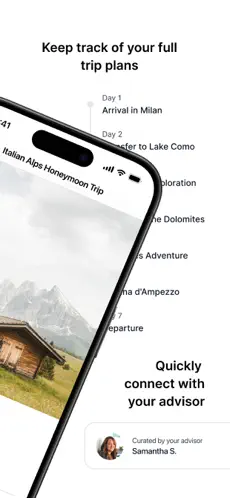
FULL TRIP TIMELINE
The Whole Picture
See your entire trip at a glance and tap into any day for the details. Connect with Barefoot directly from the app if anything comes up.
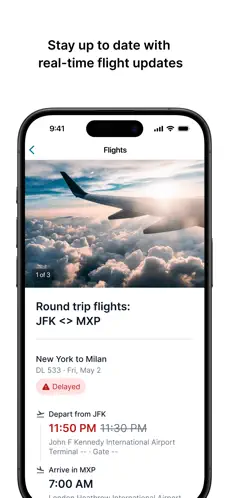
REAL-TIME FLIGHTS
Always Current
Real-time flight status, gate information, and delay alerts so you are never caught off guard at the airport.
ACCOMMODATIONS
Arrive Ready
Check-in times, property addresses, and confirmation numbers waiting for you before you ever land. No scrambling for printouts or searching through old emails.
ACTIVITIES AND TOURS
Ready to Enjoy
Tours, excursions, restaurant reservations, and every experience Barefoot arranged, with start times and locations included.
GETTING STARTED
Set Up Your Account in a Few Minutes
We recommend creating your Tern account on the web first. It is a smoother experience than starting in the app, and once your account is active the app connects automatically.
Step 1. Go to app.tern.travel/signups/new or click Sign Up at the top of the itinerary link Barefoot sends you.
Step 2. Use the same email address you have been using with us. That is how your trip connects to your account.
Step 3. If you have a Gmail address, signing up with Google is the fastest option.
Step 4. Create a password, then fill in your name, phone number, and location when prompted.
Step 5. When asked how you found Tern, select “I’m Traveling and My Advisor Suggested Tern.” That connects your account to Barefoot.
Step 6. Check your email for a confirmation from Tern and click the link to activate your account.
Once that is done, download the app and log in. Your itinerary will be there waiting.